Join our Zoom event in partnership with Microsoft & receive up to RM10,000 in Caction and Microsoft Power BI usage credits. T&Cs apply.
Field Service Management Guide
Every callback. Every delayed response. Every customer complaint.
None of these happen by accident—they're signs that your business is slipping out of
control.
The best FSM software guides technicians with SOP to-do lists, smart reminders and
AI capabilities.

+Software_.webp "What Is Field Service Management (FSM) Software? And Why You Need It More Than You Think")
Field Service Management (FSM) software is a tool that helps service businesses manage jobs, technicians, assets, customers and operations from one central platform. It connects everything from job scheduling and dispatching to technician updates, service records, reports and customer communication — giving teams complete visibility and control.
Think about a typical day in service operations. A job request comes in through WhatsApp, but is quickly lost in a slew of texts from different sites. The team only notices that when the customer asks why nobody has arrived.
Or a customer asks for an update and the manager starts digging through WhatsApp messages and notes for answers, while the customer is left on hold waiting for a response.
None of these feel like a major issue on its own. But when they happen often, they slowly create delays, inefficiencies and loss of control.
FSM software lets every job have its own organised record and digital folder, allowing managers and technicians to view real-time updates, service history, photos, reports and customer information—all in one place.
The result? Fewer surprises, fewer repeat visits and a team that spends less time chasing information — and more time delivering great service.
Field Service Management (FSM) software is not just another system to add to your business — it's the missing link that helps your entire service operation run smoothly.
Let's be honest — WhatsApp and Excel are often how service businesses get started. A technician sends an update. A manager creates a tracking sheet. And customers share issues in a group chat. It works... until it doesn't.
As operations grow, the cracks start showing. Maybe a manager has to chase five people for one update or important service reports are incomplete, causing payment delays. The issue is that your business has grown beyond informal coordination.
This is where modern Field Service Management (FSM) makes the difference. A modern FSM software combines the essential capabilities of customer management, asset tracking and workflow automation into one service-focused platform. Unlike CRM, ERP or CMMS platforms that are built primarily for customer management, business processes or asset maintenance, FSM software allows businesses to manage customers, equipment, technicians, jobs and service processes in a single connected system — without forcing teams to work across multiple disconnected tools.
Before choosing your next system, understand what CRM, ERP, CMMS and FSM are designed to solve — and why modern service businesses are moving towards FSM as the operational backbone for growth.
| System | What It Manages | Best For | Example In Service Operations |
|---|---|---|---|
| CRM Customer Relationship Management |
Customer information, sales activities and communication history | Managing relationships before and after a sale | Tracking customer contacts, contracts, enquiries and sales opportunities |
| ERP Enterprise Resource Planning |
Company-wide business processes, finance and resources | Running the overall business | Managing invoicing, purchasing, inventory, accounting and company resources |
| CMMS Computerized Maintenance Management System |
Asset information and maintenance activities | Keeping equipment reliable | Tracking asset history, preventive maintenance schedules and repair records |
| FSM Field Service Management |
Connects customers, assets, field teams and business workflows into one complete service operation | Delivering consistent, efficient and high-quality service at scale | Manage the entire service lifecycle — from customer requests and technician scheduling to job execution, SOP compliance, asset history, approvals, reporting and customer communication. Integrates customer, asset and operational data to give teams complete visibility and control. |
The important question is not “Which system is better?” The real question is: “Do you have visibility into or control over what is happening across your daily service operations?”
If your focus is customers and sales, choose a CRM. If it's business operations and finance, choose an ERP. If it's equipment and maintenance, choose a CMMS.
However, if you are a B2B service company managing technicians, field teams, customer sites and daily service operations, an FSM solution helps you coordinate work in the field, improve execution and gain better operational visibility.
Field service happens across many moving parts including customers, assets, sites and jobs. For example, in many service operations, fieldwork and asset management go hand in hand. Knowing what needs to be done is important but you also need complete asset records and service history to see the root cause—not just apply another temporary fix.
Unlike systems that solve only one part of the operation, Caction provides a complete service management ecosystem covering the entire service journey — from customer relationships and service requests to field execution, asset performance and operational visibility.

Running a service business is not just about completing more jobs. It is about making sure the right technician gets the right information, the right work gets done at the right time, and every customer receives a consistent service experience.
Sounds simple, right?
But as service operations grow, keeping everything aligned becomes much harder. And slowly, the cracks start to appear. Small operational gaps may seem harmless at first. But over time, they create bigger problems — higher costs, lower productivity, inconsistent service quality and frustrated customers.
So what's the solution?
It is creating a better way for your people, processes and information to work together.
| Benefit | The Challenge Today | How FSM Helps |
|---|---|---|
| Improve Technician Productivity | A technician arrives on-site without knowing what happened during the last repair. Instead of fixing the real problem, they are forced to guess — and the same breakdown happens again. |
FSM gives technicians the complete context before they even start the job. Service history, asset records, previous breakdowns, customer details and required procedures are available from one place. Now, technicians can diagnose faster, follow the right process and focus on solving the actual problem. |
| Reduce Operational Costs | A technician makes unnecessary trips because the right information, tools or instructions were missing. Small inefficiencies quietly add up into higher operating costs. | By having visibility into job requirements, technician availability, travel routes, completion status and recurring issues, teams can reduce avoidable visits, improve planning and prevent operational costs from growing unnoticed. |
| Increase First-Time Fix Rates | A technician completes a repair, closes the job and moves on. But did they complete every required check? Was the root cause identified? Were the correct procedures followed? |
With Caction's SOP to-do lists, critical tasks and checks are built into every job and must be completed before the job can be closed. This ensures technicians follow the right process every time, improves service consistency and increases the chance of fixing the problem correctly the first time. |
| Improve Customer Satisfaction | Customers call repeatedly because they do not know what is happening with their service request. The business is working on the issue, but the customer has no visibility. | FSM creates a connected service journey where every update, action and status change is visible. Teams can respond faster, provide accurate updates and keep customers informed without spending time searching through different messages and systems. |
| Optimise Resource Management | A critical job comes in, but managers are unsure which technician is available, who has the right experience or who can reach the customer fastest. | FSM helps managers make better decisions by giving them a clear view of technician workload, location, skills and job requirements. Instead of assigning work based on assumptions, managers can allocate resources strategically and keep operations running efficiently. |
| Strengthen Team Communication | The office has one update. The technician has another. The customer receives a different answer. Everyone is communicating, but nobody has the full picture. | FSM creates one shared operational view where technicians, supervisors and managers work from the same information. Updates no longer depend on WhatsApp messages or individual follow-ups — everyone knows what needs to happen, who is responsible and what happens next. |
| Automate Daily Workflows | Managers spend valuable time chasing approvals, reminding technicians to complete reports and checking whether tasks have been completed. | FSM turns repetitive manual follow-ups into structured workflows. Automatic reminders, approval processes, notifications and status updates ensure important steps happen consistently — reducing dependency on people remembering every detail. |
| Simplify Operations With Connected Information | Customer details are in one system. Asset records are somewhere else. Job updates are buried in conversations. Managers spend time piecing information together instead of managing operations. | FSM brings critical operational information together — customers, technicians, service records, assets and workflows. With one connected view, leaders can understand what is happening across the business and make decisions based on accurate information instead of incomplete updates. |
| Scale Without Losing Control | What worked with a small team starts breaking down as more technicians, customers and locations are added. Processes become inconsistent and managers rely too heavily on individual experience. | FSM helps businesses build repeatable processes through structured workflows, SOPs and accountability. Instead of relying on tribal knowledge, teams follow consistent ways of working — making it easier to maintain service quality as the business grows. |

Choosing FSM software is not about finding the system with the most features.
It is about finding a solution that fits the way your service business operates today — and helps you stay in control as you grow.
Before making a decision, ask these questions:
Start with your biggest operational challenges, not software features. Are you trying to reduce repeat visits, improve technician productivity, manage assets better or gain more visibility? The right FSM should solve real operational problems, not just digitise existing processes.
Service businesses are not all the same. A maintenance company, elevator company and facilities management provider have different workflows, assets and service requirements. A provider with industry experience can recommend better processes and help you avoid building inefficient workflows. Caction comes with service industry experience and ready-to-adapt templates that businesses can use right away.
Your FSM should connect with your existing CRM, ERP, accounting or other business systems — not create another information silo. Connected systems give teams a more complete view of customers, operations and performance.
The system that works for 10 technicians may not work for 100. Look for software that can support more users, locations, customers, assets and more complex workflows as your business expands.
The best system is the one your team actually adopts. Technicians need simple mobile workflows, while managers need clear visibility without complicated processes. A system that is difficult to use will become another burden instead of a solution.
Every service business has different SOPs, approval processes and reporting requirements. Choose software that can be configured around your operation instead of forcing your team into a fixed process.
Implementation is not just about installing software. Your team needs onboarding, training and ongoing guidance. Local support is especially important because service operations often require practical advice based on real working conditions.
Do not only compare subscription prices. Ask, "What will it save and what will it help us achieve?" Imagine an FSM that reduces repetitive administrative work, so your team can focus on serving customers. An FSM with built-in SOP checklists equips technicians to deliver quality work every time, gives managers complete visibility to make confident decisions, and helps your business grow without compromising service standards or customer satisfaction.
Reviews matter, but industry relevance matters more. Look for examples from companies with similar operational challenges and service models.
A demo or free trial helps you understand whether the system fits your team's daily workflow. Test how technicians use it, how managers track operations and whether it genuinely improves visibility.
Not all FSM software is built the same. Some systems are designed mainly to schedule jobs.
But growing service businesses need more than that.
They need a system that helps them answer, "What is happening with every job?" or "Are teams following the right process?" When comparing FSM software, focus on the features that create better visibility, accountability and control.
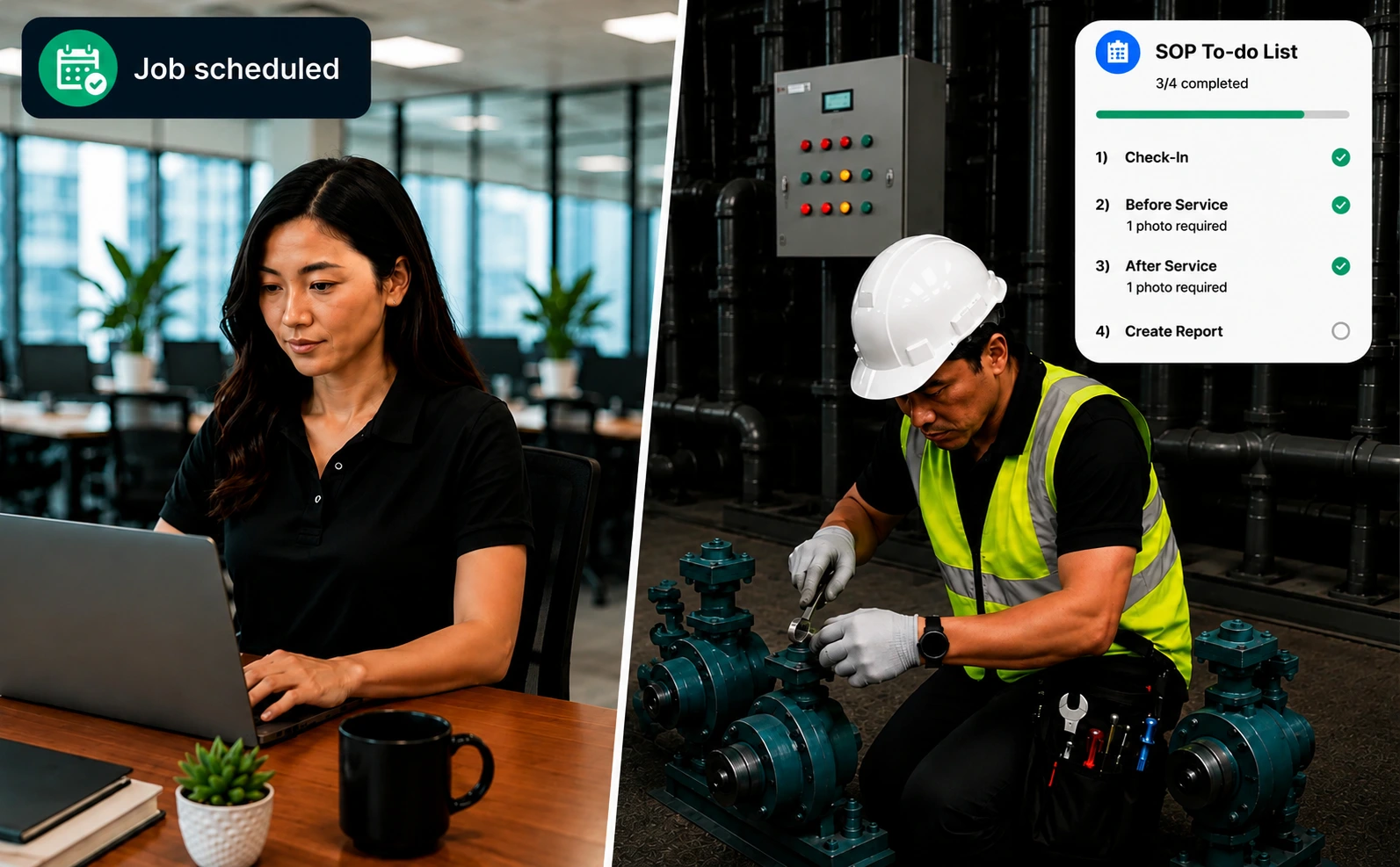
Caction is embedded with a customised SOP to-do list that technicians must complete before they can close the job.
Each task on the to-do list can require proof of completion, including timestamped photos or videos, geofenced location verification, and even customer signatures where approval is required. This ensures every critical step is completed correctly—not skipped or simply ticked off.
Once the job is finished, all information and evidence are automatically compiled into professional PDF service reports, removing manual and repetitive work for your team while delivering the values of transparency and professionalism to customers. The result is consistent service quality, stronger accountability, easier compliance, and greater confidence that every technician is following your company's standards on every job.
A strong FSM system should enable businesses to create, assign, track and complete service jobs efficiently.
Features such as intelligent scheduling, technician assignment, priority management and real-time job tracking help teams coordinate work better, improve response times and ensure the right resources are assigned to the right tasks.
A mobile FSM application connects field technicians with critical operational information while on-site.
Technicians can access job details, customer information, asset history, SOP to-do lists and complete digital reports directly from their devices — improving productivity, reducing delays and ensuring technicians have the right information to complete jobs correctly.
For asset-intensive service businesses, asset visibility is essential.
FSM software should connect asset records with maintenance history, repair activities and service data, allowing businesses to understand equipment performance and identify recurring issues.
Caction extends this with QR asset scanning, allowing technicians to instantly access asset information, log equipment conditions and track service performance. Our AI-powered system also offers insights like asset breakdown rates and Mean Time Between Failures (MTBF) in easy-to-understand charts.
A complete FSM platform should support proactive maintenance, not only reactive repairs.
Recurring maintenance schedules, automated reminders, inspection workflows and preventive maintenance planning help businesses improve asset uptime, reduce unexpected failures and maintain consistent service delivery.
Standard FSM reporting often stops at basic dashboards — showing historical metrics like completed jobs, open tickets, or billable hours. While useful for tracking performance, these disconnected reports leave managers manually piecing together data to understand the real causes behind delays, repeat failures, or customer issues.
Modern FSM platforms with operational intelligence go further by connecting field updates, technician activity, asset history, and inventory data in real time. Instead of just showing what happened, they reveal why it happened — identifying recurring equipment failures, scheduling bottlenecks, and improvement opportunities before they impact operations.
When choosing FSM software, look beyond basic reporting. Choose a platform that turns operational data into actionable insights like Caction, helping leaders make faster decisions and stay ahead as their business grows.
When comparing FSM software, look beyond basic digital forms. Many platforms still require technicians to manually enter repetitive details like customer information, timestamps, and locations for every job. Modern FSM systems streamline this process by automatically capturing site details, technician profiles, job parameters, checklists, and digital sign-offs — allowing teams to generate complete, standardized reports with minimal effort.
The real value comes from how these records are managed. Advanced platforms link every service report directly to customer profiles and project history, creating a centralized audit trail that makes it easy for teams to search, track, and review field activities anytime.
Managers need visibility into what is happening across field operations without constantly chasing updates.
Technicians can capture timestamped photos, videos and digital service records directly from site, creating verifiable proof of work that is automatically organised into professional, branded service reports.
FSM software should connect customer information with every service interaction.
A complete view of customer profiles, service history, quotations, service requests and previous work helps teams respond faster and deliver a more consistent customer experience.
Advanced platforms can also support quotation management, payment collection and customer communication, allowing businesses to manage the complete service journey from request to payment.
Effective FSM software helps businesses optimise technician capacity and service resources.
By improving resource allocation, tracking materials and connecting operational activities with available resources, teams can reduce inefficiencies and complete jobs more effectively.
Still exporting data into spreadsheets every month? Caction eliminates the manual work by letting you filter, analyse and generate reports instantly. Whether you're preparing for a board meeting or reviewing daily operations, you'll always have accurate, up-to-date information at your fingertips.
A robust FSM platform should also provide public API capabilities, allowing businesses to connect with other enterprise systems and build workflows that match their operational needs.
As businesses grow, the system should support more technicians, customers, assets and locations without increasing operational complexity.
Field Service Management (FSM) software can transform how service businesses operate — but like any operational system, it comes with considerations.
The value comes from choosing a platform that fits your workflow, supports your teams and grows with your business.
FSM gives managers a real-time view of jobs, technicians, customers and assets. Instead of relying on updates from multiple people, leaders can see what is happening across the operation.
Technicians can access customer history, asset records and previous service information before arriving on-site, helping them diagnose problems faster and resolve issues correctly.
Digital reports, automated updates and workflow automation reduce manual paperwork and repetitive follow-ups, allowing teams to focus on delivering better service.
With clear job ownership, digital records and service tracking, businesses can improve accountability and ensure important tasks are completed properly.
FSM creates structured processes that allow businesses to manage more technicians, customers and locations without increasing operational complexity.
Moving from WhatsApp, spreadsheets and manual processes requires teams to adopt new ways of working and follow more structured workflows.
A successful FSM rollout requires proper setup, workflow configuration and team alignment to ensure the system matches business needs.
Technicians and office teams need time to become comfortable with new tools, especially if they have relied on traditional methods for years.
Service operations become more connected to the system, making reliability, support and offline capabilities important considerations.
Some FSM platforms are too rigid, forcing businesses to change their workflows instead of adapting to how they actually operate.
Investing in new software requires careful consideration.
Caction allows businesses to
experience the platform through a free trial before committing. With a flexible
pricing model based on active users per month, businesses can start with their
current operational needs and scale as they grow.
Software only creates value when teams use it consistently.
Caction is built with a
user-friendly experience for both office teams and field technicians. The mobile
application is designed for real working environments, allowing technicians to quickly
update jobs, complete reports and access information without complicated processes.
Businesses may also leverage HRD Corp claimable training support to help teams
transition smoothly.
Field teams do not always operate in perfect environments.
Caction supports offline
functionality, allowing technicians to continue working even in areas with limited
connectivity. With reliable cloud infrastructure and dedicated support, businesses can
reduce disruption and maintain operational continuity.
Every service business has different workflows, SOPs and reporting requirements.
Caction does not force businesses into a fixed process. Through configurable
workflows, custom forms and no-code/low-code tools, companies can adapt the platform to
match their actual operations.
With one-to-one consultation, Caction helps businesses
configure workflows that improve efficiency while maintaining their existing
operational requirements.
The goal of FSM is not to replace one manual process with another digital
process.
The goal is to create a more visible, structured and scalable way of running service
operations.
With the right platform, businesses can move from reactive coordination to proactive
management — improving service quality while maintaining control as they grow.
Caction helps service leaders build operations that are easier to manage today and
ready for tomorrow's growth.
Ready to see what FSM software built for real service operations looks like?